
![Odroid H5 [130001]](https://www.odroid.nl/image/cache/catalog/H5 Board/Hero Images/H5bb-500x500.jpg "Odroid H5 [130001]")
![Odroid H5 [130001]](https://www.odroid.nl/image/cache/catalog/H5I-800x635-500x500.jpg "Odroid H5 [130001]")
![Odroid H5 [130001]](https://www.odroid.nl/image/cache/catalog/Odroid-H5/H5gg-500x500.jpg "Odroid H5 [130001]")
![Odroid H5 [130001]](https://www.odroid.nl/image/cache/catalog/Odroid-H5/H5ff-500x500.jpg "Odroid H5 [130001]")
![Odroid H5 [130001]](https://www.odroid.nl/image/cache/catalog/Odroid-H5/H5dd-500x500.jpg "Odroid H5 [130001]")
![Odroid H5 [130001]](https://www.odroid.nl/image/cache/catalog/Odroid-H5/H5A-500x500.jpg "Odroid H5 [130001]")
![Odroid H5 [130001]](https://www.odroid.nl/image/cache/catalog/Odroid-H5/H5bb-500x500.jpg "Odroid H5 [130001]")
![Odroid H5 [130001]](https://www.odroid.nl/image/cache/catalog/Odroid-H5/H5cc-500x500.jpg "Odroid H5 [130001]")
The ODROID-H-series is going 10 GbE
NOW AVAILABLE IN UK STOCK FOR NEXT DAY DELIVERY
Imagine you have a Single-Board Computer with onboard 10 GbE networking, being low cost and low power consumption, allowing 24×7 usage without ballooning the monthly energy bills to unsustainable amounts.
Imagine this very same SBC provides you with 4, yes 4 M.2 slots, 3 being PCIe Gen 3 x2 lanes, 1 being PCIe Gen 3 x1 lane, allowing user customisation with NVMe SSDs or PCIe to 6 Gbps SATA or additional NICs or WiFi 6e or 7 or AI accelerators or custom cards (e.g. sensors)
The team at Hardkernel imagined it and decided to make it a reality!
Introducing the ODROID-H5
Hardkernel is introducing the ODROID-H5, which includes a complete reconfiguration of the 9 High-Speed IO (HSIO) lanes, plus a dedicated USB 3.1 Gen 2 10 Gbps lane provided by the processor.
| Click Here For PDF Data Sheet |
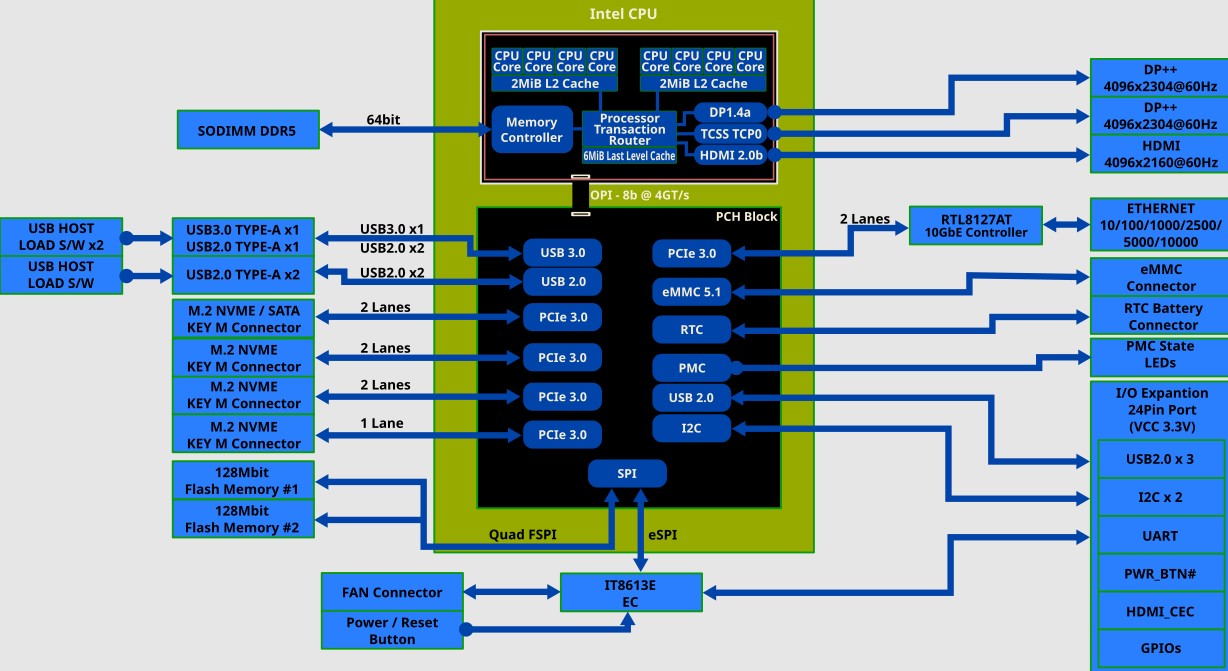
| Specifications | |
| Processor | Intel i3 N300 Octa-Core: Max Turbo Frequency 3.80 GHz |
| Memory | 1 x DDR5 SO-DIMM slot |
| Single Channel, up to 4800 MT/s (5600MT/s or higher speed DRAM modules are still compatible) | |
| Max memory capacity 64GB | |
| In Band Error Correction Code (IBECC) Support | |
| DDR3/DDR4 are not supported | |
| Storage | 1 x eMMC connector (bootable and selectable in BIOS) |
| Various eMMC modules can be purchased at the Hardkernel store separately | |
| 3 x M.2 slot (PCIe 3.0 x 2, supports NGFF-2280 cards) | |
| 1 x M.2 slot (PCIe 3.0 x 1, supports NGFF-2280 cards) | |
| Networking | 1 x 10 GbE LAN port (RJ45, supports 10/100/1000/2500/5000/10000 Mbps) |
| Realtek RTL8127 | |
| Supports Wake-On-Lan | |
| LED indicators (Green: Link, Amber: Traffic) | |
| Video | 1 x HDMI 2.0 (up to 4K@60Hz) |
| 2 x DisplayPort 1.2 (up to 4K@60Hz) | |
| Audio | No Analog output, only Digital output from HDMI and DisplayPort |
| External I/O | 1 x USB 3.0 port |
| 3 x USB 2.0 ports | |
| 1 x Peripheral Expansion Header (24-pin, 2.54mm pitch) | |
| – 1 x DC 5V, 1 x DC 3.3V, 5 x GND | |
| – 1 x UART (TXD/RXD/RTS/CTS: 3.3V I/O level) | |
| – 2 x I2C (SCL/SDA : 3.3Volt IO level) | |
| – 1 x External Power Button | |
| – HDMI CEC, 5VA+ | |
| – 3 x USB 2.0 | |
| – All 3.3V I/O signal level | |
| Other features | Passive Heatsink |
| BIOS Backup Battery | |
| – Maintains system time and BIOS settings | |
| Power Button | |
| Reset Button | |
| System LEDS Indicators: | |
| – Red (PWR) – Solid light when DC power is supplied | |
| – Blue (left, SLEEP) – turns off only when the system enters suspend mode | |
| – Blue (right, PMIC) – turns on only when the major power rails are working | |
| – Green (NVMe) – Flashes when NVMe data transfers | |
| Active Cooling Fan Connector (12V 4-pin, PWM input + TACHO output) | |
| – Active Cooling Fan is optional | |
| – Connector (4-pin, 2.54mm pitch) | |
| Power | DC jack: outer (ground) diameter 5.5mm, inner(positive) diameter 2.1mm |
| DC input voltage range: 11V ~ 20V | |
| – DC 15V/4A power adapter is recommended | |
| Power consumption: | |
| – Headless Idle: ≃ 3.3W | |
| – Desktop GUI Idle: ≃ 4.5W | |
| – CPU + GPU stress test: ≃25W | |
| – Power-off: ≃0.4W | |
| – Suspend: ≃0.9~1.3W | |
| Form Factor | 120mm x 120mm x 44mm Approx. |
| Weight: 320g including heatsink |
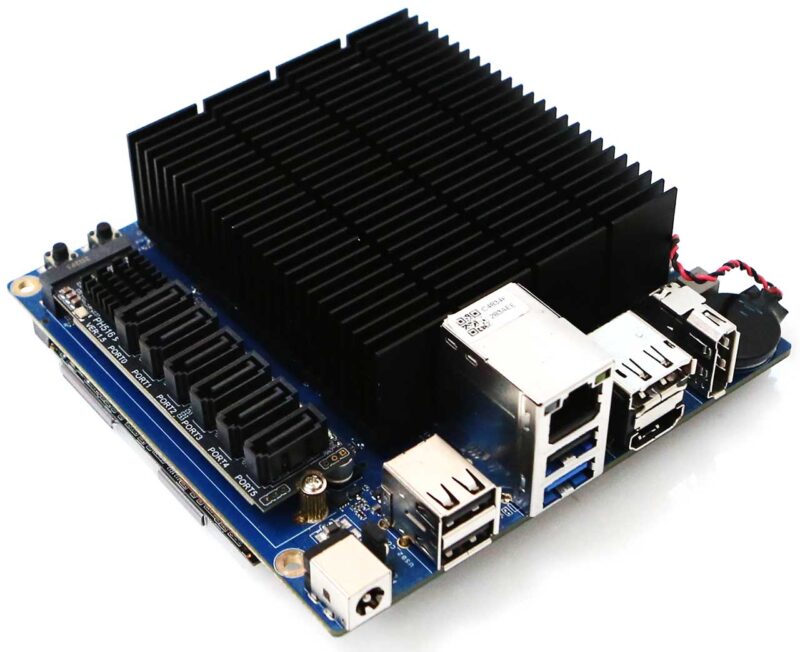
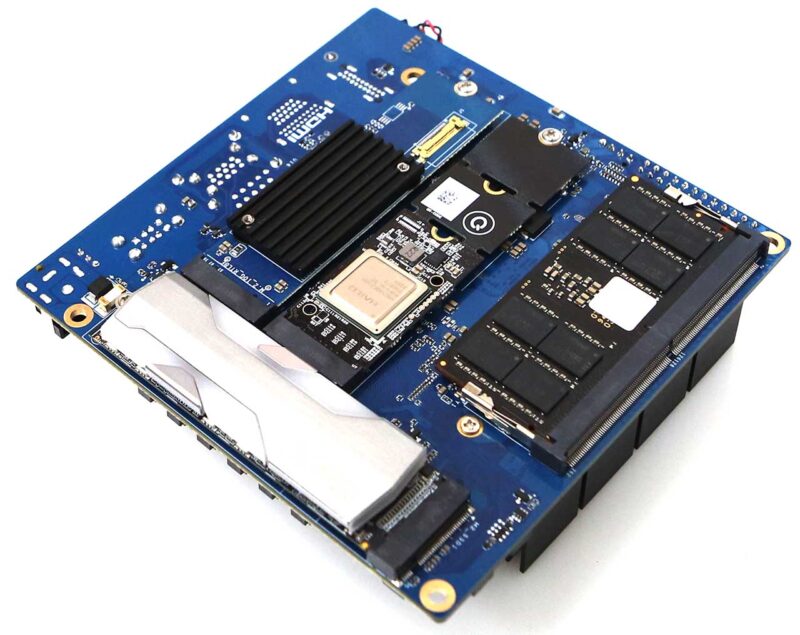
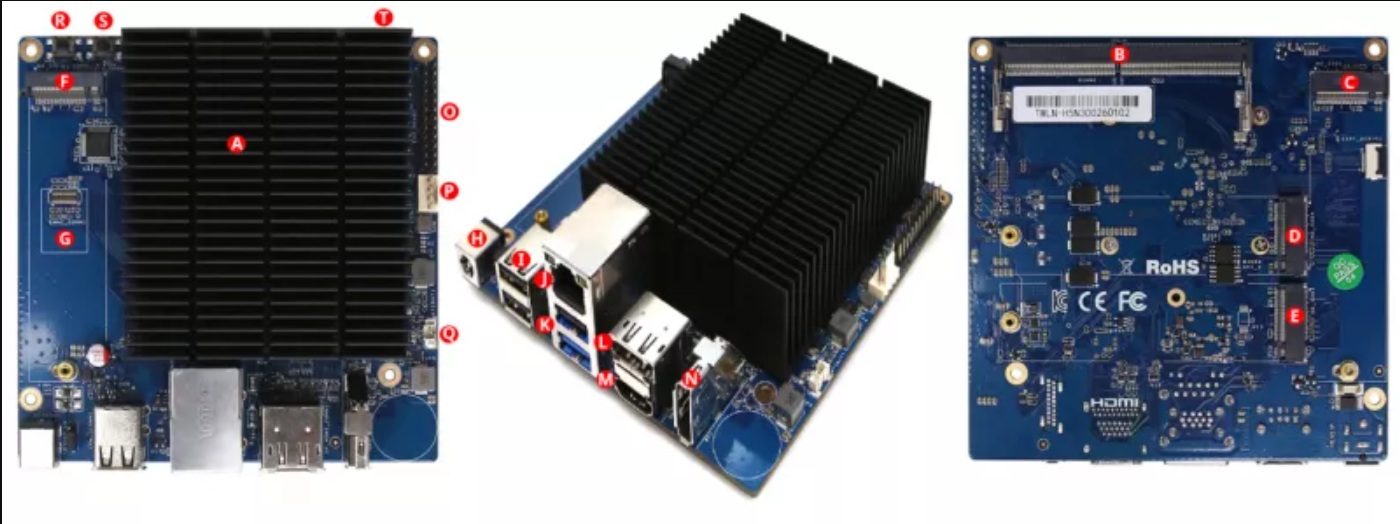
- A. CPU (Intel N300 )
- B. 1 x DDR5 SO-DIMM slots (Single channel memory support)
- C. 1 x M.2 Slot PCIe 3.0 x 2 (Label M2_SSD1)
- D. 1 x M.2 Slot PCIe 3.0 x 1 (Label M2_SSD4)
- E. 1 x M.2 Slot PCIe 3.0 x 2 (Label M2_SSD3)
- F. 1 x M.2 Slot PCIe 3.0 x 2 (Label M2_SSD2)
- G. 1 x eMMC (Embedded Multimedia-Card) Socket
- H. 1 x DC Power Jack
- I. 3 x USB 2.0
- J. 1 x RJ45 Ethernet Port (10/100/1000/2500/10000)
- K. 1x USB 2.0 and 1 x USB 3.0
- L. 1 x DisplayPort 1.2
- M. 1 x HDMI 2.0
- N. 1 x DisplayPort 1.2
- O. 1 x Peripheral Expansion Header (24-pin)
- P. 1 x Active Cooling Fan Connector (4-pin)
- Q. 1 x RTC/CMOS Backup Battery Connector (2-pin)
- R. 1 x Power Switch
- S. 1 x Reset Switch
- T. 4 x System LED Indicators
The Genesis of the ODROID-H5
Network Evolution: 2.5GbE vs. 10GbE
For years, the adoption of 10GbE networking remained a luxury for home labs and SOHO environments, often sidelined by prohibitive deployment and maintenance costs. However, the landscape has shifted; the infrastructure for high-speed connectivity is now more accessible than ever, with affordable switches and adapters becoming the new standard.
While legacy 10GbE NICs were notorious for high power draw and excessive thermal output, the ODROID-H5 leverages the cutting-edge RTL8127 controller. This results in an eco-friendly SBC that delivers massive bandwidth without the burden of unsustainable energy bills.
It was time to embrace a new tier of performance: experience networking speeds 10x faster than 1GbE and 4x faster than 2.5GbE solutions.
A Paradigm Shift in M.2 Expandability
The ODROID-H4 series offered a single M.2 slot utilising four PCIe 3.0 lanes; the H5 series redefined this architecture with 3 x M.2 slots (x2 lanes) plus 1 x M.2 slot (x1 lane). This allows for the simultaneous installation of up to four NGFF PCIe devices natively, eliminating the need for external M.2 splitter cards.
This expanded slot array offers unprecedented flexibility. Users can now architect high-density configurations featuring multiple NVMe storage pools, AI NPU accelerators, additional NICs, WiFi modules, LTE/5G connectivity, or even external GPUs.
Architectural Nuances & Refinements
We have maintained the core features that define the H-series DNA, including in-band ECC support, dual flash BIOS, the versatile 24-pin IO header, and the standard PWM cooling fan connector, all within the familiar board form factor.
The previous dual 2.5GbE configuration has evolved into a single, high-performance 10GbE network port. For those requiring dual connectivity, our 10GbE M.2 Card provides an elegant expansion path.
As the industry moves away from SATA storage, we have removed the traditional SATA ports found on the H4 Plus/Ultra models to prioritise M.2 density. For power users with legacy HDD or SATA SSD, we recommend our optional 6-Port SATA M.2 Card.
In addition, infrequently used analogue and optical audio ports were removed to simplify I/O and reduce the board height, as well as the BOM. Note that you can get the audio from the HDMI port.
Status Report: ODROID-H4 Series
The Hardkernel team apologises for the recent H4 series stock shortage. We sincerely apologise for the inconvenience caused. The global semiconductor market remains highly unstable, and as major manufacturers focus on producing enterprise AI components, it is having a severe impact on the supply and pricing of general-purpose CPUs and memory chips.
We are prepared to immediately resume H4 series production as soon as CPU supplies are secured, but we have not yet received a definitive supply schedule from our suppliers. Additionally, we must inform you that securing the parts required for future H5 production is also facing significant difficulties.
Despite these supply chain issues, we remain committed to the H series. We will make every direct and indirect effort to resolve these issues.
Annex
Unlimited Performance Mode
Starting with the Core 10th generation, Intel introduced Power Limit 4 (PL4) and made it user configurable via the BIOS. What is it? PL4 is the SoC’s maximum power limit at the package level. No matter what the CPU is actually doing, it will not pass this limit. The interesting side of the story is that as a user you can set it to 0, which means no limit.
Fortunately, Intel carried it with the Alder Lake-N processors.
The ODROID-H5 BIOS allows you to set this limit to 0. This is what we call Unlimited Performance mode. The default value is 30,000, corresponding to the Balanced mode, meaning around a SoC’s maximum power limit of 17W for the N300 of the H5.
Using the Unlimited Performance mode (annotated UP) with the ODROID-H5 enables the CPU to turbo boost indefinitely: 2.3 GHz for all cores and 3.8 GHz for one core.
As you may expect, the CPU will get hot quickly (in a matter of minutes) and get close to its T Junction (Tj) temperature, which will trigger its emergency shutdown as thermal protection. But the CPU will not reach Tj because it will automatically throttle down when it is about 5 degrees Celsius away from Tj (we tested this multiple times). As soon as the CPU thermally throttles down, you start losing the increased performance you were aiming at while still consuming more power compared to the Balanced mode. Not ideal.
In order to prevent thermal throttling when using the Unlimited Performance mode, the solution is simple: active cooling with a fan.
We designed the H5 heat sink to make it very efficient: (a) you do not need a fan in Balanced mode, (b) it has a high rate of thermal exchange when coupled with a fan.
Using a fan will decrease the maximal CPU temperature by about 25 to 30 degrees Celsius depending on factors such as the ambient temperature. It is difficult for us to give you precise temperature values because what one witnesses depends on many factors: as already mentioned, the ambient temperature, the CPU BGA soldering thickness error, the heat sink assembly tolerance, the type of thermal paste and quantity applied, the cooling fan speed RPM error margin (which can be as high as 5 to 10%). All of these factors can result in a 10+ degrees Celsius difference between one setting and another.
The important point is that with active cooling you get the increased performance you aim at while the CPU stays just comfortably warm while turbo boosting indefinitely, way below temperatures close to Tj. In other words, the active cooling fan brings you the best of both worlds. This is what we witnessed and validated while performing many tests in different locations.
Last point: in Unlimited Performance mode, the CPU (and the fan) use more power than they do in Balanced mode, easily reaching 25 watts with the ODROID-H5. However, this happens only when the CPU is indeed turbo boosting. When idle, the system will use the same power as in Balanced mode. If your goal is to minimise energy consumption, use Balanced mode. If your goal is to maximise performance, use Unlimited Performance mode and again use active cooling with a fan to avoid the CPU from being constantly throttled down.
For learning how to change PL4 in the BIOS, as well as change the fan settings, please refer to the related Wiki page.
WIKI: https://wiki.odroid.com/odroid-h5/start
Starting with the Core 10th generation, Intel introduced Power Limit 4 (PL4) and made it user configurable via the BIOS. What is it? PL4 is the SoC’s maximum power limit at the package level. No matter what the CPU is actually doing, it will not pass this limit. The interesting side of the story is that as a user you can set it to 0, which means no limit.
Fortunately, Intel carried it with the Alder Lake-N processors.
The ODROID-H5 BIOS allows you to set this limit to 0. This is what we call Unlimited Performance mode. The default value is 30,000, corresponding to the Balanced mode, meaning around a SoC’s maximum power limit of 17W for the N300 of the H5.
Using the Unlimited Performance mode (annotated UP) with the ODROID-H5 enables the CPU to turbo boost indefinitely: 2.3 GHz for all cores and 3.8 GHz for one core.
As you may expect, the CPU will get hot quickly (in a matter of minutes) and get close to its T Junction (Tj) temperature, which will trigger its emergency shutdown as thermal protection. But the CPU will not reach Tj because it will automatically throttle down when it is about 5 degrees Celsius away from Tj (we tested this multiple times). As soon as the CPU thermally throttles down, you start losing the increased performance you were aiming at while still consuming more power compared to the Balanced mode. Not ideal.
In order to prevent thermal throttling when using the Unlimited Performance mode, the solution is simple: active cooling with a fan.
We designed the H5 heat sink to make it very efficient: (a) you do not need a fan in Balanced mode, (b) it has a high rate of thermal exchange when coupled with a fan.
Using a fan will decrease the maximal CPU temperature by about 25 to 30 degrees Celsius depending on factors such as the ambient temperature. It is difficult for us to give you precise temperature values because what one witnesses depends on many factors: as already mentioned, the ambient temperature, the CPU BGA soldering thickness error, the heat sink assembly tolerance, the type of thermal paste and quantity applied, the cooling fan speed RPM error margin (which can be as high as 5 to 10%). All of these factors can result in a 10+ degrees Celsius difference between one setting and another.
The important point is that with active cooling you get the increased performance you aim at while the CPU stays just comfortably warm while turbo boosting indefinitely, way below temperatures close to Tj. In other words, the active cooling fan brings you the best of both worlds. This is what we witnessed and validated while performing many tests in different locations.
Last point: in Unlimited Performance mode, the CPU (and the fan) use more power than they do in Balanced mode, easily reaching 25 watts with the ODROID-H5. However, this happens only when the CPU is indeed turbo boosting. When idle, the system will use the same power as in Balanced mode. If your goal is to minimise energy consumption, use Balanced mode. If your goal is to maximise performance, use Unlimited Performance mode and again use active cooling with a fan to avoid the CPU from being constantly throttled down.
For learning how to change PL4 in the BIOS, as well as change the fan settings, please refer to the related Wiki page.
WIKI: https://wiki.odroid.com/odroid-h5/start
Odroid H5 [130001]
Related Products
![6-Port SATA M.2 Card [131000]](https://www.odroid.nl/image/cache/catalog/sata6ga1-80x80.jpg "6-Port SATA M.2 Card [131000]")
6-Port SATA M.2 Card [131000]
DESCRIPTIONAs the industry observes a steady decline in the ubiquity of SATA storage such as HDDs, t..
27.14€ Ex Tax: 27.14€
![10GbE M.2 Card [134000]](https://www.odroid.nl/image/cache/catalog/h5acca-80x80.jpg "10GbE M.2 Card [134000]")
10GbE M.2 Card [134000]
DESCRIPTIONWhile the H5 board features a native RTL8127 10GbE port, we recognize that power users ma..
74.34€ Ex Tax: 74.34€
![H5 Mini-ITX Kit [133000]](https://www.odroid.nl/image/cache/catalog/H5miniitxA-80x80.jpg "H5 Mini-ITX Kit [133000]")
H5 Mini-ITX Kit [133000]
DESCRIPTIONDesigned for maximum versatility, this specialized adapter kit allows you to seamlessly i..
16.52€ Ex Tax: 16.52€
![ODROID-H5 Case Type1 [132000]](https://www.odroid.nl/image/cache/catalog/H5casetype1A-80x80.jpg "ODROID-H5 Case Type1 [132000]")
ODROID-H5 Case Type1 [132000]
DESCRIPTIONCrafted for a seamless build experience, this DIY case kit is specifically engineered to ..
10.62€ Ex Tax: 10.62€